The invisible email pixel: what the French regulator CNIL allows since 2026
A single invisible pixel tells a sender who opened an email, when and on which device. France's data protection authority set the rules in April 2026: consent, exemptions, proof, withdrawal. What changes for a newsletter, a marketing email or a plain business email.
Nearly every newsletter, and many marketing emails, contain an image nobody sees: a transparent square one pixel wide and one pixel high, tucked at the bottom of the message. Its only job is to tell the sender that you opened the email.
Long tolerated without much thought, this tracking pixel now has its own rules. On 12 March 2026 the CNIL, France’s data protection authority, adopted a recommendation dedicated to it (deliberation no. 2026-042), published on 14 April 2026. The law firm Seban Avocats has published a detailed analysis (in French). Here is what to take away, whether you send a newsletter or ordinary business emails.
How a tracking pixel works
An HTML email can display images hosted on a server. When you open the message, your mail app fetches those images. The tracking pixel relies on this: its address contains an identifier unique to each recipient, such as https://track.example.com/o/8f3a2c.gif.
When the image is requested, the server therefore knows who opened the email, when, and often from which IP address and with which software. Repeated on every open, this builds a precise history of your reading.
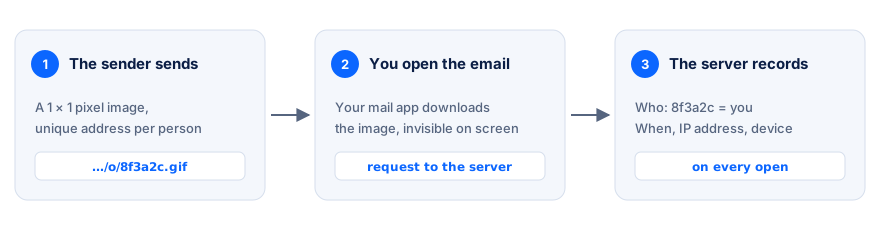
The pixel is never displayed: downloading it is what informs the sender.
One important point: the size of the image does not matter. A perfectly visible signature logo becomes a tracking pixel as soon as its address changes from one recipient to the next. Conversely, a logo with the same address for everyone cannot tell who opened the email.
Why it is regulated like a cookie
The CNIL considers that loading this pixel amounts to reading information on the recipient’s device. That is exactly what Article 82 of the French Data Protection Act covers, the same provision (implementing the EU ePrivacy Directive) that already governs cookies on websites (see our guide Cookies and consent).
The consequence is the same: unless an exemption applies, the recipient’s prior consent is required. This also applies between businesses: B2B prospecting is exempt from consent for the sending itself, not for the tracker it contains.
When consent is required
According to Seban Avocats’ analysis, consent is required in particular to:
- measure the open rate of a campaign in order to evaluate or improve it;
- personalise or profile: adapt messages, or target the person elsewhere, based on what they open;
- detect abnormal opens (fraud, mass opens);
- track deliverability recipient by recipient, outside the exempt case described below.
In other words: knowing whether a specific person read your message, for your statistics or to follow up, requires their agreement.
The two exempt cases
Deliverability of emails the person asked for. A sender may track opens without consent if it uses them only to stop writing to people who no longer open its emails, or to space out its sends. The exemption only covers messages linked to a requested service: so-called transactional emails (order confirmation, invoice, account alert, password reset, security alert) and emails the person has consented to. Data must be kept to a minimum: according to Seban Avocats, only the day of the last open is kept, the previous one being deleted.
Security. According to the same analysis, a pixel used solely for security measures linked to authentication is also exempt.
Outside these two cases: no pixel without agreement.
Collecting valid consent
- When the address is collected, with a short explanation of what tracking is used for: this is the recommended approach.
- A separate tick box for each purpose. Consent to receive the newsletter is not consent to open tracking.
- Failing that, send an email with no tracker at all, containing a link to a page where the person agrees through a clear action. Agreement must not be inferable from an image simply loading.
- Silence means refusal, and refusing must be as easy as accepting.
- Proof must be individual. A clause in which a provider promises to have collected consent is not enough.
- Withdrawal must remain possible at any time, through a link in the footer of every email, including in messages already sent that the person might reopen later.
For addresses collected before publication, the CNIL allowed three months to clearly inform recipients and let them object easily to tracking, in principle until 14 July 2026. That period has ended.
Business emails sent one at a time
Many tools now offer to “know whether your email was read”: Gmail or Outlook extensions, CRMs, prospecting software. They all work with a pixel.
Yet for an email written to a client, a supplier or a town hall, there is in practice no way to collect consent before sending it. This kind of tracking therefore fits poorly within the CNIL’s framework. And it is unreliable:
- Apple Mail preloads the images of every message: an unread email shows as opened;
- Outlook and many corporate mail systems block images by default: a read email shows as unopened;
- Gmail loads images through its own servers, which hides the IP address and location;
- a message forwarded to a colleague counts as an open by the original recipient.
Tracking your emails without a tracker
What you really want to know is often less “did they open it?” than “should I follow up?”. Several reliable signals require no pixel:
| Signal | What it tells you | Why it involves no tracker |
|---|---|---|
| Non-delivery report (bounce) | The address does not exist or the mailbox refuses the message | The recipient’s server replies |
| Reply received | The message was read and dealt with | The person writes back themselves |
| Read receipt | The person confirms they read it | They choose whether to send it |
| ”I have read this” button | Reading confirmed voluntarily | The person clicks; nothing fires on opening |
| No news for X days | Time to follow up | A simple calculation from the sending date |
An action button in the message (“Confirm the appointment”, “View the quote”) also gives useful information: it is a deliberate action, not reading tracked without the person’s knowledge. Mail antivirus software sometimes opens links on its own; to avoid false confirmations, the landing page should ask for a final click on a button rather than validating as soon as it loads.
Spotting a pixel in an email you received
- Display the message source: “Show original” in Gmail, “View source” in most webmail apps.
- Look for
<imgtags: an image of 1 × 1 pixel, hidden (display:none), or whose address contains a long identifier. - Check the domain: an emailing service rather than the sender’s own website is a good clue.
- To protect yourself, turn off automatic image loading in your mail app: without loading, no pixel fires.
Links in an email can be tracked too: if they go through a redirect domain before reaching the real site, the click is recorded.
In short
- A tracking pixel is a tracker, just like a cookie: prior consent, except for the deliverability of requested emails and for security.
- A separate tick box, silence means refusal, individual proof and a withdrawal link in every email.
- For business emails sent one at a time, rely on replies, read receipts and non-delivery reports: they are reliable and require nobody’s agreement.
This article is general information about French rules, not legal advice. Sources: CNIL recommendation on tracking pixels (deliberation no. 2026-042 of 12 March 2026, in French) and Seban Avocats’ analysis of 27 August 2026 (in French).